NGINX Ingress Deprecated: Migrate to HAProxy Ingress in Kubernetes
Migrating from NGINX Ingress to HAProxy Ingress in Kubernetes: A Complete Technical Guide
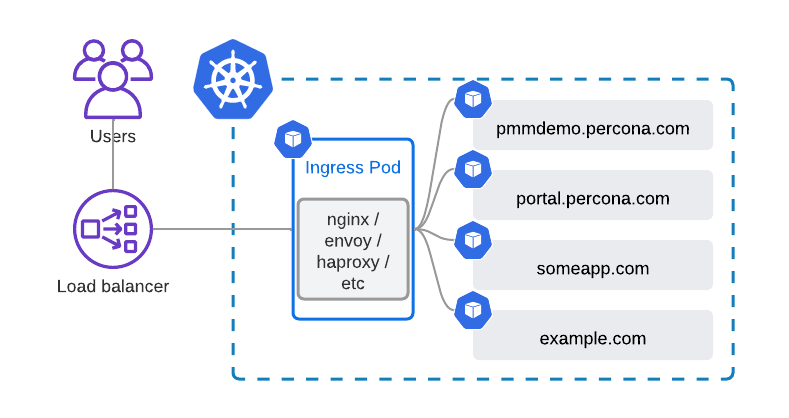
Ingress NGINX has been a staple in Kubernetes environments for HTTP/HTTPS traffic routing for years. However, as of March 2026, support for NGINX Ingress in certain Kubernetes distributions will be deprecated https://kubernetes.io/blog/2025/11/11/ingress-nginx-retirement/ .
This post provides a detailed, technical roadmap to migrate to HAProxy Ingress, a high-performance, modern alternative.
Why Replace NGINX Ingress?
- End-of-life / deprecation: NGINX Ingress will no longer receive updates, security patches, or feature improvements in some managed Kubernetes platforms.
- Limited observability: Metrics and telemetry in NGINX Ingress are less granular; HAProxy Ingress provides Prometheus metrics, latency histograms, and error tracking out-of-the-box.
- Performance bottlenecks: For high concurrency workloads, NGINX Ingress can experience latency spikes due to connection handling limitations.
- Advanced routing: HAProxy Ingress supports weighted routing, canary deployments, header-based routing, and more.
HAProxy Ingress: Overview
HAProxy Ingress is designed for modern Kubernetes workloads. It provides high-performance load balancing, advanced routing, and enterprise-grade TLS/SSL management. Key features include:
- High-performance TCP/HTTP load balancing
- Advanced routing: path-based, header-based, weighted, and canary deployments
- SSL/TLS termination, rate limiting, and WAF support
- Prometheus metrics and full observability
- Flexible annotations for ingress behavior
Prerequisites
- Kubernetes cluster (v1.25+ recommended)
- kubectl configured with cluster access
- Helm 3 installed
- Optional: Prometheus/Grafana for metrics monitoring
Step 1: Create a Namespace for HAProxy Ingress
kubectl create namespace haproxy-ingress
Step 2: Add the HAProxy Helm Repository
helm repo add haproxytech https://haproxytech.github.io/helm-charts
helm repo update
Step 3: Deploy HAProxy Ingress Controller with Helm
helm install haproxy-ingress haproxytech/kubernetes-ingress \
  --namespace haproxy-ingress \
  --set controller.service.type=LoadBalancer \
  --set controller.metrics.enabled=true \
  --set controller.metrics.serviceMonitor.enabled=true
This deploys HAProxy Ingress with Prometheus metrics enabled and exposes it via a LoadBalancer service.
the link of values.yaml : https://github.com/haproxy-ingress/charts/blob/release-0.15/haproxy-ingress/values.yaml
Step 4: Verify Deployment
kubectl get pods -n haproxy-ingress
kubectl get svc -n haproxy-ingress
You should see a pod named haproxy-ingress-controller running and a LoadBalancer service with an external IP.
Step 5: Configure Your Ingress Resources
Update your Kubernetes Ingress resources with HAProxy-specific annotations:
apiVersion: networking.k8s.io/v1
kind: Ingress
metadata:
  name: example-ingress
  namespace: default
  annotations:
    haproxy.org/ssl-redirect: "true"
    haproxy.org/timeout-client: "30s"
    haproxy.org/timeout-server: "30s"
spec:
  rules:
  - host: example.yourdomain.com
    http:
      paths:
      - path: /
        pathType: Prefix
        backend:
          service:
            name: my-app
            port:
              number: 80
  tls:
  - hosts:
    - example.yourdomain.com
    secretName: tls-secret
Step 6: Test Routing
kubectl port-forward svc/haproxy-ingress 8080:80 -n haproxy-ingress
curl http://localhost
Verify that requests route correctly to your application and SSL/TLS termination works if configured.
Step 7: Optional ConfigMap for HAProxy Settings
apiVersion: v1
kind: ConfigMap
metadata:
  name: haproxy-ingress-config
  namespace: haproxy-ingress
data:
  maxconn: "20000"
  timeout-client: "30s"
  timeout-server: "30s"
  stats-enabled: "true"
  stats-uri: "/haproxy?stats"
Step 8: Gradual Cutover from NGINX Ingress
- Audit existing NGINX Ingress resources:
kubectl get ingress --all-namespaces -o yaml > nginx-ingress-backup.yaml - Deploy HAProxy Ingress in a separate namespace for testing.
- Update Ingress resources with HAProxy annotations.
- Verify traffic, metrics, and TLS termination.
- Switch DNS or service endpoints to HAProxy Ingress.
- Remove NGINX Ingress after validation.
Step 9: Cleanup (Optional)
helm uninstall haproxy-ingress -n haproxy-ingress
kubectl delete namespace haproxy-ingress
Conclusion
Migrating from NGINX Ingress to HAProxy Ingress ensures your Kubernetes workloads are secure, scalable, and highly observable. Using Helm simplifies deployment and configuration, enabling DevOps teams to integrate HAProxy quickly and efficiently. This migration also prepares your clusters for future high-performance workloads, advanced routing, and observability requirements.
Tags: #Kubernetes, #HAProxy, #NGINX, #DevOps, Ingress, Helm, CI/CD, Cloud, Observability